


You.com MCP connector
Bearer Token SearchAIConnect to You.com MCP. Search the web, research topics with cited sources, and extract full page content using You.com's AI-powered search and research...
You.com MCP connector
-
Install the SDK
Section titled “Install the SDK”Terminal window npm install @scalekit-sdk/nodeTerminal window pip install scalekit -
Set your credentials
Section titled “Set your credentials”Add your Scalekit credentials to your
.envfile. Find values in app.scalekit.com > Developers > API Credentials..env SCALEKIT_ENVIRONMENT_URL=<your-environment-url>SCALEKIT_CLIENT_ID=<your-client-id>SCALEKIT_CLIENT_SECRET=<your-client-secret> -
Set up the connector
Section titled “Set up the connector”Register your You.com MCP credentials with Scalekit so it can authenticate requests on your behalf. You do this once per environment.
Dashboard setup steps
Register your You.com API key with Scalekit so it can authenticate and proxy search requests on behalf of your users. You.com MCP uses API key authentication — there is no redirect URI or OAuth flow.
-
Get a You.com API key
- Go to you.platform and sign in or create an account.
- In the left sidebar, under API Management, click API Keys.
- Enter a name for your key (e.g.
Agent Auth) and click Create.
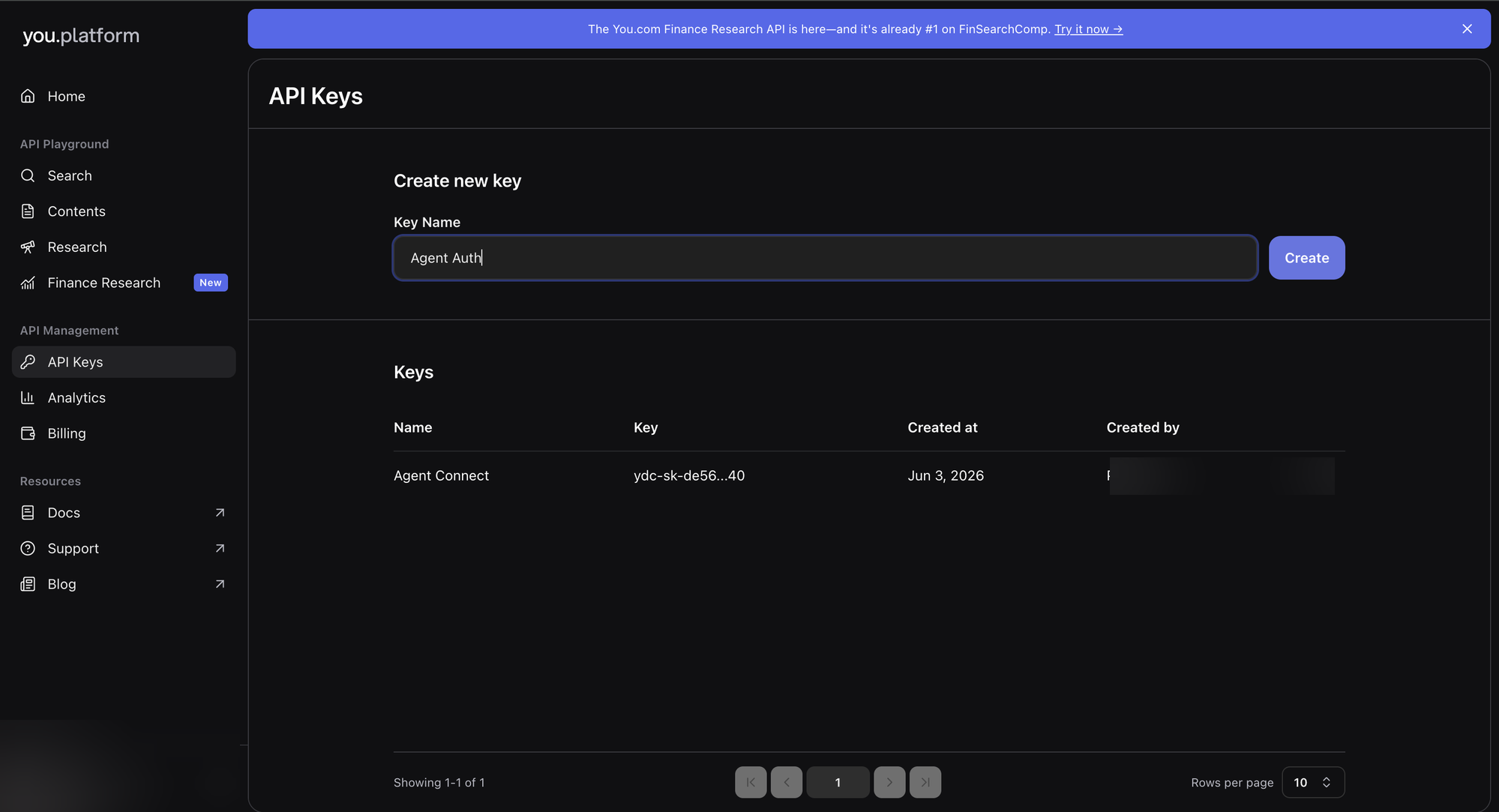
- Copy the generated key — it starts with
ydc-sk-.
-
Create a connection in Scalekit
- In the Scalekit dashboard, go to AgentKit → Connections → Create Connection.
- Search for You.com MCP and click Create.
- Note the Connection name — use this as
connection_namein your code (e.g.,youmcp).
-
Add a connected account
Connected accounts link a specific user identifier in your system to a You.com API key. Add them via the dashboard for testing, or via the Scalekit API in production.
Via dashboard (for testing)
- Open the connection and click the Connected Accounts tab → Add account.
- Fill in Your User’s ID and API Key, then click Save.
Via API (for production)
await scalekit.connect.upsertConnectedAccount({connectionName: 'youmcp',identifier: 'user@example.com',credentials: { apiKey: 'ydc-sk-...' },})scalekit_client.connect.upsert_connected_account(connection_name="youmcp",identifier="user@example.com",credentials={"api_key": "ydc-sk-..."},)
-
-
Make your first call
Section titled “Make your first call”quickstart.ts import { ScalekitClient } from '@scalekit-sdk/node'import 'dotenv/config'const scalekit = new ScalekitClient(process.env.SCALEKIT_ENV_URL,process.env.SCALEKIT_CLIENT_ID,process.env.SCALEKIT_CLIENT_SECRET,)const actions = scalekit.actionsconst connector = 'youmcp'const identifier = 'user_123'// Make your first callconst result = await actions.executeTool({connector,identifier,toolName: 'youmcp_you-contents',toolInput: { urls: [] },})console.log(result)quickstart.py import osfrom scalekit.client import ScalekitClientfrom dotenv import load_dotenvload_dotenv()scalekit_client = ScalekitClient(env_url=os.getenv("SCALEKIT_ENV_URL"),client_id=os.getenv("SCALEKIT_CLIENT_ID"),client_secret=os.getenv("SCALEKIT_CLIENT_SECRET"),)actions = scalekit_client.actionsconnection_name = "youmcp"identifier = "user_123"# Make your first callresult = actions.execute_tool(tool_input={"urls":[]},tool_name="youmcp_you-contents",connection_name=connection_name,identifier=identifier,)print(result)
What you can do
Section titled “What you can do”Connect this agent connector to let your agent:
- You-search records — Search the web and news using You.com
- You-research records — Research a topic in depth using You.com’s AI
- You-contents records — Extract content from one or more web pages in markdown, HTML, or structured metadata format
Tool list
Section titled “Tool list”Use the exact tool names from the Tool list below when you call execute_tool. If you’re not sure which name to use, list the tools available for the current user first.
youmcp_you-contents
#
Extract content from one or more web pages in markdown, HTML, or structured metadata format. Supports up to 100 URLs per call. 4 params
Extract content from one or more web pages in markdown, HTML, or structured metadata format. Supports up to 100 URLs per call.
urls array required One or more public HTTP/HTTPS URLs to extract content from (up to 100). crawl_timeout number optional Timeout in seconds for live-crawling pages (1–60). format string optional (Deprecated) Output format - use formats array instead formats array optional Output formats to return: markdown (plain text), html (layout preserved), or metadata (structured data). youmcp_you-research
#
Research a topic in depth using You.com's AI. Returns comprehensive answers with cited sources at configurable effort levels (lite, standard, deep, exhaustive). 2 params
Research a topic in depth using You.com's AI. Returns comprehensive answers with cited sources at configurable effort levels (lite, standard, deep, exhaustive).
input string required The research question or complex query for in-depth multi-step investigation (max 40,000 characters). research_effort string optional How much effort to spend: lite (fast), standard (balanced), deep (thorough), exhaustive (most comprehensive). youmcp_you-search
#
Search the web and news using You.com. Supports domain filtering, language and country targeting, freshness filters, and live-crawl for full page content. 12 params
Search the web and news using You.com. Supports domain filtering, language and country targeting, freshness filters, and live-crawl for full page content.
query string required Search query string. Supports operators: site:domain.com, filetype:pdf, +term, -term, AND/OR/NOT, lang:en. count integer optional Maximum number of results to return per section (1–100). country string optional Country code to localize search results (ISO 3166-1 alpha-2). crawl_timeout integer optional Timeout in seconds for live-crawling pages (1–60). exclude_domains array optional List of domains to exclude from search results (up to 500). freshness string optional Limit results by recency: day, week, month, year, or a date range YYYY-MM-DDtoYYYY-MM-DD. include_domains array optional List of domains to restrict search results to (up to 500). language string optional Language code (BCP 47) to filter search results. livecrawl string optional Enable live-crawling of full page content for the specified section: web, news, or all. livecrawl_formats array optional Output formats for live-crawled content: html and/or markdown. offset integer optional Pagination offset for results (0–9). safesearch string optional Safe-search filter level applied to results.